Server Room Temperature: What ASHRAE Actually Recommends, and Where the Sensor Goes
TL;DR: ASHRAE recommends an inlet air temperature of 18 to 27°C for every class of IT equipment, with humidity held below 60% RH. The part of the room that punishes a warm day hardest is the UPS: lead acid batteries lose roughly half their life for every 8 to 10°C above 25°C. So the server room temperature that matters is measured at the rack inlet and beside the batteries, not by the thermostat on the wall.
Last updated: 11 September 2026
On this page
Key takeaways
- ASHRAE’s recommended envelope is 18 to 27°C at the server inlet for all four equipment classes, with dew point between -9°C and 15°C and no more than 60% RH.
- Class A1 equipment is allowed to run from 15 to 32°C. Allowable is a tolerance, not a target.
- Lead acid UPS batteries prefer 15 to 25°C, and ASHRAE’s rule of thumb is that their life halves for every 8 to 10°C above 25°C.
- ASHRAE notes that temperature varies aisle to aisle, rack to rack and along the height of a rack, so one sensor on the wall measures the wrong thing.
- A cellular sensor such as the Milesight TS601 needs no gateway, but it needs a phone signal. Test the signal in the room before you buy.
What temperature should a server room be?
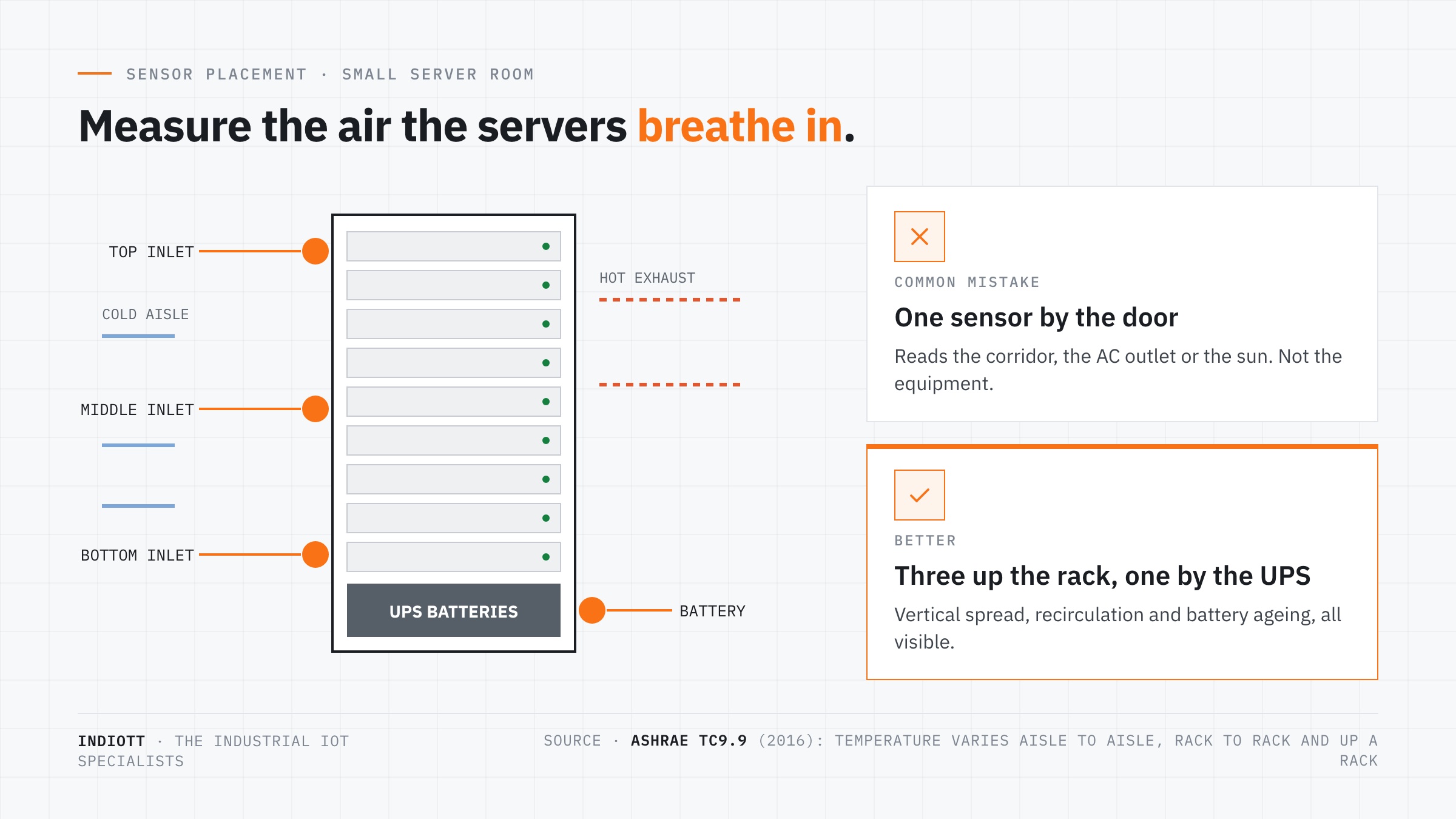
A server room should hold an inlet air temperature between 18 and 27°C, which is ASHRAE’s recommended envelope for all four classes of air cooled IT equipment. Humidity should stay between a dew point of -9°C and 15°C, and below 60% RH. Those figures refer to the air entering the equipment, which is the server room temperature your hardware actually experiences.
The recommended server room temperature has widened over time. ASHRAE’s first thermal guidelines in 2004 recommended 20 to 25°C, a conservative figure chosen when reliability was the only concern. The recommendation later moved to 18 to 27°C, and in 2011 ASHRAE published equipment classes that allow operation from 5 up to 45°C for the most tolerant hardware. The history is set out in the ASHRAE TC9.9 white paper on data centre power equipment, which is free to download.
| ASHRAE envelope | Dry bulb temperature | Humidity |
|---|---|---|
| Recommended, all classes A1 to A4 | 18 to 27°C | -9°C to 15°C dew point, max 60% RH |
| Allowable, class A1 | 15 to 32°C | 8% to 80% RH, dew point up to 17°C |
| Widest class, A4 | 5 to 45°C | allowable only |
Most small server rooms and comms cupboards in the UK contain class A1 or A2 equipment and a UPS, which is why the recommended band, not the allowable one, is the sensible server room temperature alarm threshold. A server room temperature of 30°C is inside the A1 allowable range and still a warning sign.
Why does the UPS set the real limit?
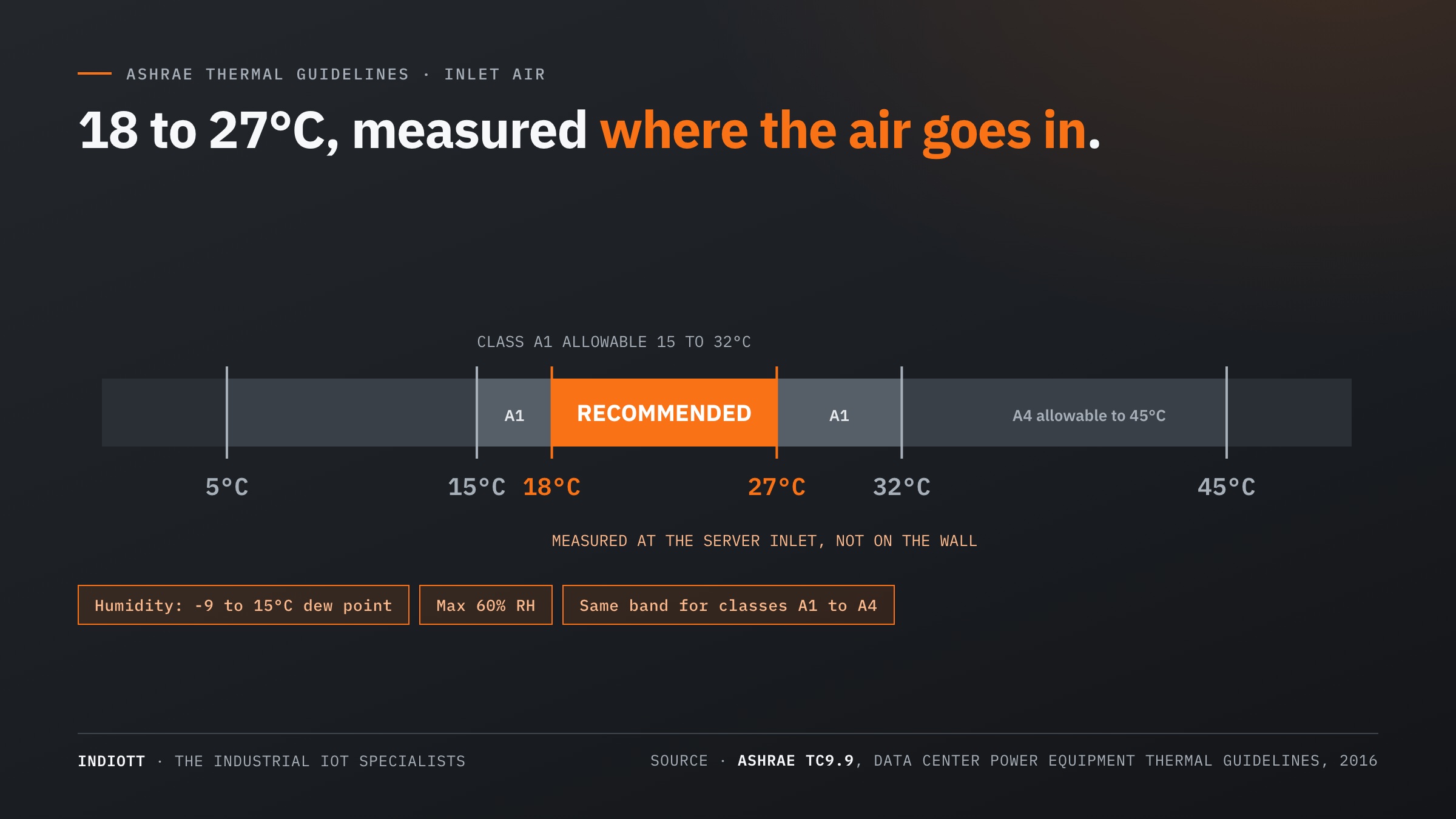
Because batteries age faster than servers in warm air. ASHRAE’s guidance is that lead acid batteries need a narrow range of 15 to 25°C, with 25°C the ideal, and as a rule of thumb lose half their lifetime for every 8 to 10°C above it. A server room temperature that is merely warm for the servers can quietly halve the life of the batteries beside them.
Run that rule forward. A battery bank rated at 25°C that lives permanently at 33 to 35°C should be expected to last around half its rated life, and at 41 to 45°C around a quarter. The servers above it would still be inside their A1 allowable range at 32°C, and nothing on the dashboard would look alarming.
ASHRAE is careful about what matters. A single short excursion, its example is 100 hours at 40°C, will not significantly shorten battery life. Sustained operation, 24 hours a day, 7 days a week, will. That is why a monitoring record is more useful than a spot reading: battery life follows the time spent in each temperature band over a year, which is exactly what a logged server room temperature gives you.
Cold has a cost too. ASHRAE notes that temperatures below 18°C can reduce battery power output, so a room cooled hard to protect the batteries can shorten the runtime you are relying on during a power cut.
Where should a server room temperature sensor go?
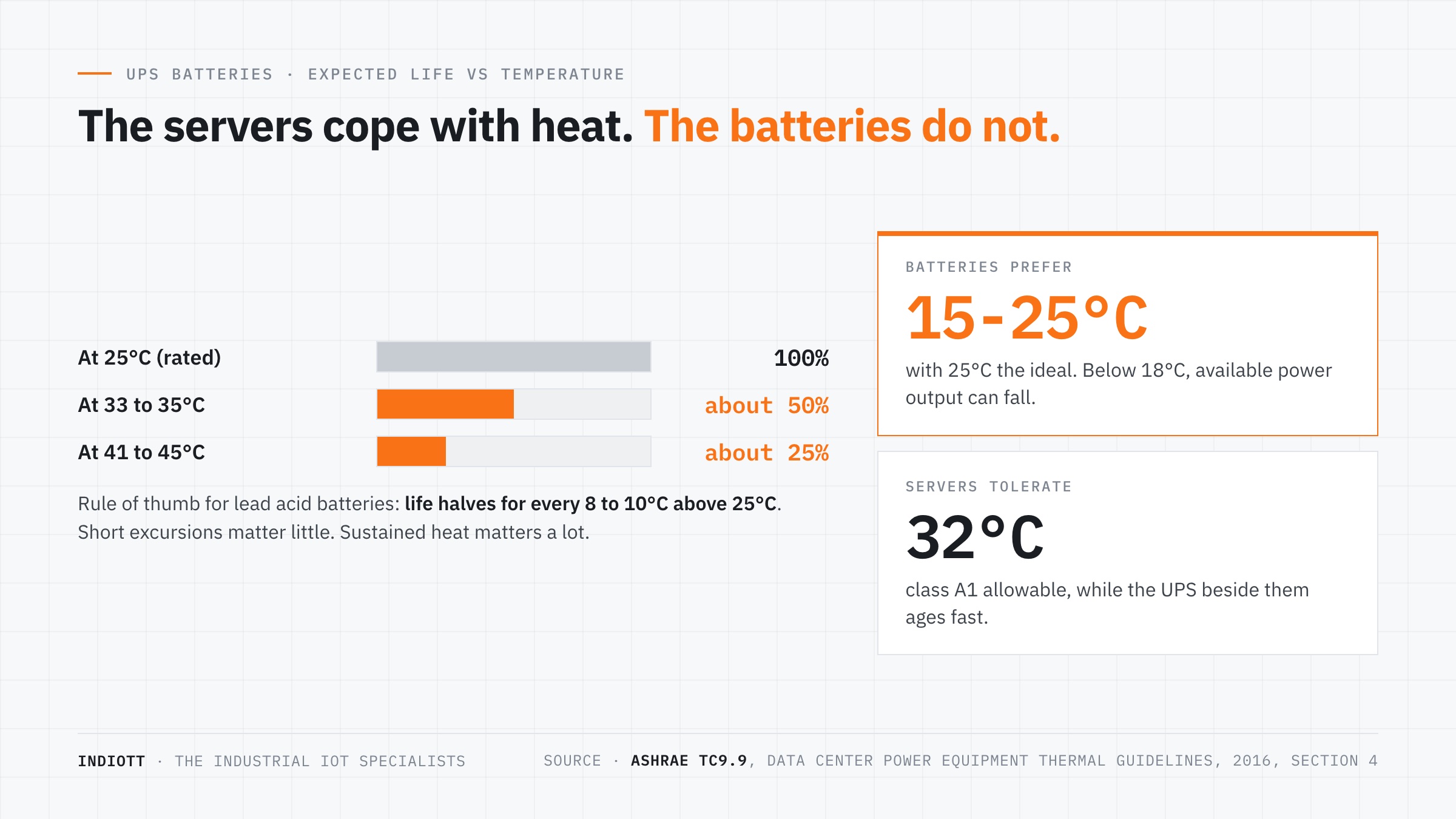
Measure server room temperature at the inlet side of the racks, and beside the UPS. ASHRAE observes that in a real room it is difficult to keep temperature uniform from aisle to aisle, from rack to rack, and along the height of a rack, and that heat can travel to batteries from IT equipment in adjacent racks. A single server room temperature sensor on the wall by the door reports none of that.
A practical layout for a small room or comms cupboard looks like this:
- Rack inlet, top. Warm exhaust recirculating over the top of the racks shows up here first.
- Rack inlet, middle and bottom on the busiest rack, so you can see the vertical spread.
- Beside the UPS batteries, ideally at battery height, because that is the reading that predicts replacement cost.
- The door, with a contact sensor, so an open door and a temperature rise can be read together.
Avoid mounting a sensor in the direct outlet of the air conditioning unit, on an outside wall, or anywhere that sunlight reaches it. All three produce a server room temperature that is true for the sensor and wrong for the equipment.
What about humidity?
Keep it inside the recommended band: a dew point between -9°C and 15°C and no more than 60% RH. Too dry raises the risk of static discharge, too damp risks condensation, and a sudden change often points to a cooling fault or water where it should not be. Measure humidity with the same sensors you use for server room temperature, rather than as a separate system.
The Milesight EM300-TH reads temperature to a typical ±0.3°C between 0 and 70°C, and humidity to a typical ±3% between 10% and 90% RH. The TS601 reads temperature to a typical ±0.2°C between 0 and 65°C and humidity to a typical ±2% RH. Both are ample for a room with a 9°C wide recommended band.
Cellular or LoRaWAN: which sensor for a comms room?
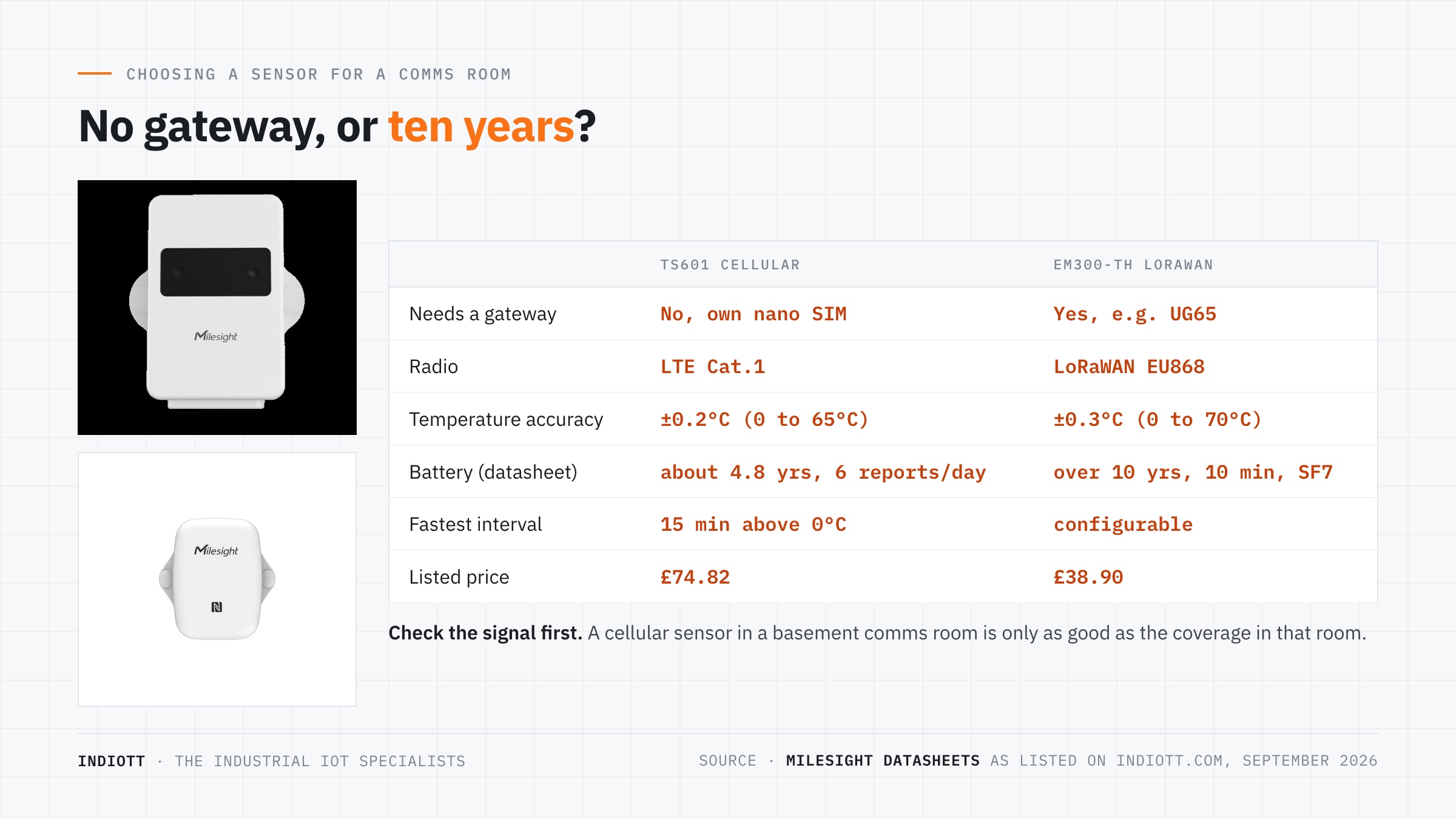
For server room temperature in one or two isolated rooms, choose cellular, and LoRaWAN when there are several rooms or other sensors in the same building. The difference is the infrastructure: a cellular sensor carries its own SIM, while a LoRaWAN sensor needs a gateway, which then serves every sensor in range for a decade or more.
The Milesight TS601 is the cellular option. It uses LTE Cat.1 with a nano SIM, reports over MQTT, TCP, UDP or AWS, raises threshold alarms, stores 5,000 readings locally for retransmission, and is listed at £74.82. Its datasheet gives around 4.8 years of battery on MQTT at six reports a day, measured at -20°C. The limitation is honest and important: it needs a mobile signal, and basement comms rooms in steel or concrete buildings often do not have one. Check with Ofcom’s coverage checker, then check again with a phone in the room itself.
The LoRaWAN option is the EM300-TH at £38.90, with over 10 years of battery at a 10 minute interval under good radio conditions, paired with a gateway such as the Milesight UG65. One gateway can then carry leak sensors under the raised floor, a door contact and the temperature points on every rack.
One more limit worth knowing: the TS601 cannot report more often than every 15 minutes above 0°C. For server room temperature that is fine, because its threshold alarm fires on the breach, but it is not a tool for watching a transient.
What should trigger an alarm?
Set the first server room temperature alarm at the top of the recommended band and the second at the top of the allowable band. At the rack inlet that means a warning at 27°C and an urgent alarm at 32°C for class A1 equipment. Beside the UPS, alarm on a sustained reading above 25°C rather than on a spike, because it is time at temperature that shortens battery life.
Add a humidity alarm at 60% RH, a door contact that alerts after a set time open, and a rate of rise alarm if your platform supports one. A rise of several degrees in minutes usually means a cooling failure, and that is worth waking someone up for even when the absolute server room temperature is still acceptable.
Frequently asked questions
What is the ideal server room temperature?
ASHRAE recommends 18 to 27°C at the server inlet for all classes of air cooled IT equipment. Many operators aim for a server room temperature in the middle of that band. What matters is that the reading is taken where the air enters the equipment.
What is the maximum temperature for a server room?
For class A1 equipment the allowable maximum is 32°C at the inlet, and the widest class, A4, allows 45°C. Allowable is a tolerance for short periods, and batteries in the same room degrade well before servers do.
How does heat affect UPS batteries?
ASHRAE’s rule of thumb is that lead acid battery life halves for every 8 to 10°C above 25°C. Short excursions matter little. Sustained warm operation shortens life significantly.
What humidity should a server room have?
ASHRAE’s recommended range is a dew point between -9°C and 15°C with relative humidity no higher than 60%. Class A1 equipment is allowed from 8% to 80% RH.
Do I need a gateway to monitor a server room?
Not with a cellular sensor such as the TS601, which carries its own SIM. A LoRaWAN sensor needs a gateway, which becomes worthwhile when you have several rooms or want leak and door sensors on the same network.
Where to start
To see your real server room temperature, put three sensors up the front of your busiest rack and one beside the batteries, and leave them for a month. The trace will show you whether the room has a cooling problem, a recirculation problem, or simply a warm afternoon problem, and each has a different fix.
Our server room monitoring page covers the full set of temperature, leak, power and access sensors, and the Kit Builder will put a priced kit together for your room. If you run a larger hall with hot and cold aisles, see data centre aisle temperature monitoring.
Next step
Get a priced kit list for your site
Answer three quick questions and tell us where to send it. An engineer replies within one working day with the parts, the prices and the lead time.
Rather talk it through? Call 023 9223 3611
Received. An engineer has it.
You will hear back within one working day with the parts, the prices and the lead time. A confirmation is on its way to your inbox.
If it is urgent, call 023 9223 3611.