Duty Cycle Limits: Only 36 Seconds an Hour in the UK
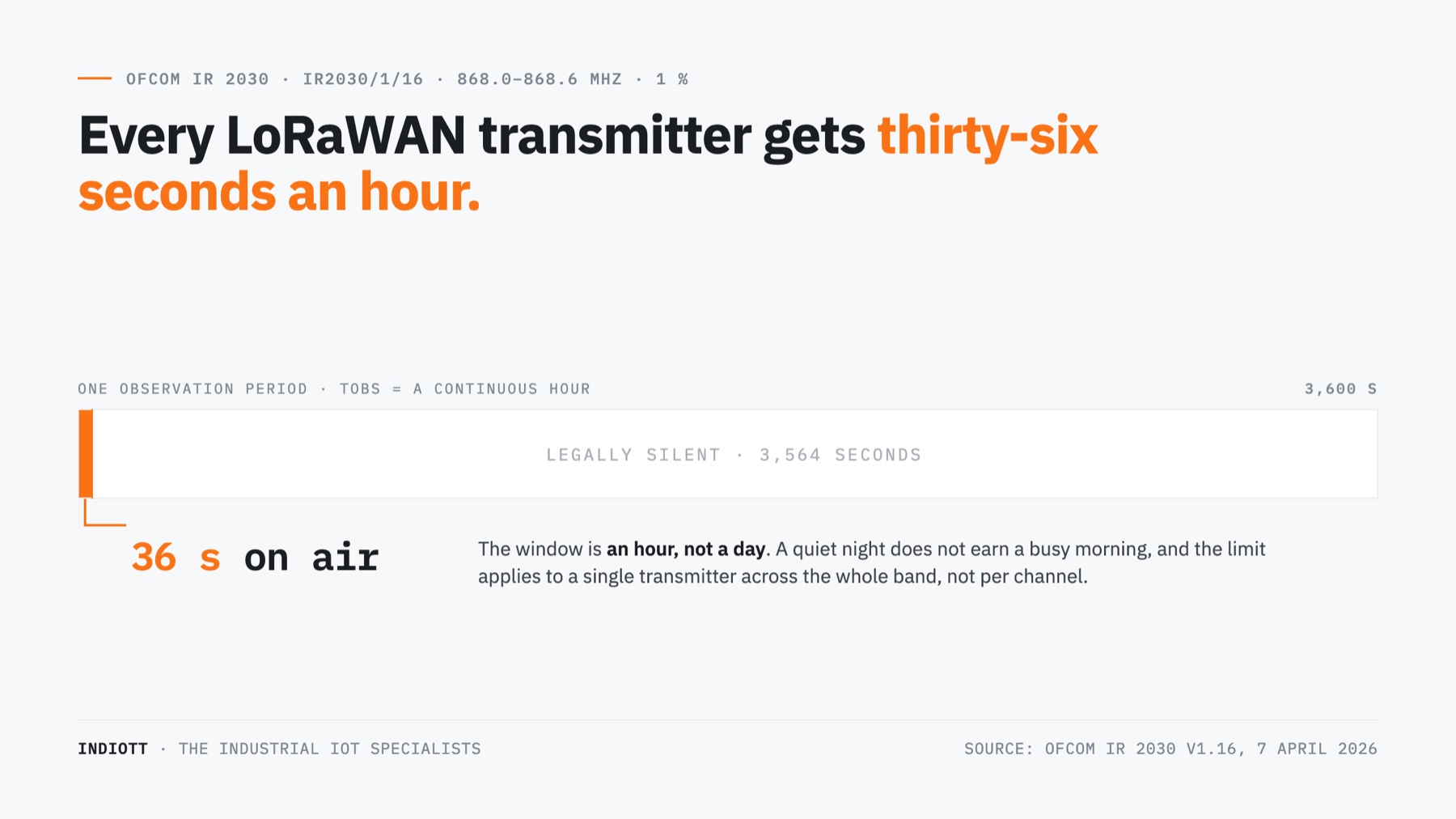
TL;DR: In the UK a LoRaWAN device in the 868 MHz band may transmit for one percent of any hour. That is 36 seconds. The duty cycle is set by Ofcom, not by your network server, and it binds the gateway exactly as hard as it binds the sensors. Most networks that quietly stop answering have not run out of coverage. They have run out of duty cycle.
Last updated: 24 August 2026
On this page
Key takeaways
- Ofcom defines the observation period as a continuous one hour. So a one percent limit is 36 seconds an hour, not 864 seconds a day. You cannot save it up and you cannot borrow it back.
- One uplink at SF12 carrying a ten byte payload occupies 1,483 ms of air and buys 147 seconds of enforced silence. The identical message at SF7 takes 62 ms. Same sensor, same data, 24 times the cost.
- The allowance is per band, not per channel. The three default uplink channels, 868.1, 868.3 and 868.5 MHz, all sit inside one Ofcom entry and share one budget.
- A gateway is one transmitter answering hundreds of devices. Replying in the first receive window at SF12, it can manage roughly 31 downlinks an hour for the entire network.
- That is why the second receive window sits at 869.525 MHz. That frequency falls in the one UK sub band that allows 10 percent and 500 mW.
- A £658 gateway has exactly the same duty cycle as a £99 one. Money buys range, ruggedness and backhaul. It does not buy airtime.
What the UK duty cycle rule actually says
The duty cycle is a radio regulation, not a LoRaWAN feature. In the UK it lives in Ofcom’s Interface Requirement IR 2030, the document that makes licence exempt short range devices legal to operate. Entry IR2030/1/16 covers 868.0 to 868.6 MHz at 25 mW e.r.p., and sets the alternative compliance route as a duty cycle limit of one percent.
The definition is the part worth reading twice. IR 2030 says the duty cycle is the ratio of the on time of a single transmitter device to the observation period, and that “unless otherwise specified in the technical provisions, Tobs is a continuous one hour period and Fobs is the applicable frequency band”.
Two things follow, and almost every explainer online skips both. The window is an hour, so the widely quoted 864 seconds a day is arithmetically true and operationally misleading. And the scope is the band, not the channel.
The current edition was published on 7 April 2026, version 1.16, harmonised with CEPT Recommendation 70-03. For a UK site this is the governing document, not the ETSI standard most vendor pages cite. The entries covering 863 to 870 MHz:
- IR2030/1/13, 863 to 865 MHz, 25 mW e.r.p., limit 0.1 percent.
- IR2030/1/16, 868.0 to 868.6 MHz, 25 mW e.r.p., duty cycle 1 percent. This is the LoRaWAN workhorse.
- IR2030/1/17, 868.7 to 869.2 MHz, 25 mW e.r.p., limit 0.1 percent.
- IR2030/1/19, 869.40 to 869.65 MHz, 500 mW e.r.p., limit 10 percent. The generous one.
- The 867.4 to 867.6 MHz entry is the odd one out, and the only place the regulator names roles: 10 percent for data network access points, 2.5 percent for other data network devices.
How long is one percent of an hour?
Thirty six seconds. That is the entire transmit budget for one device in the 868.0 to 868.6 MHz band, and it is spent in milliseconds rather than messages, because a LoRa message has no fixed length. Its time on air depends on the spreading factor, which the network chooses based on how well the gateway hears each device.
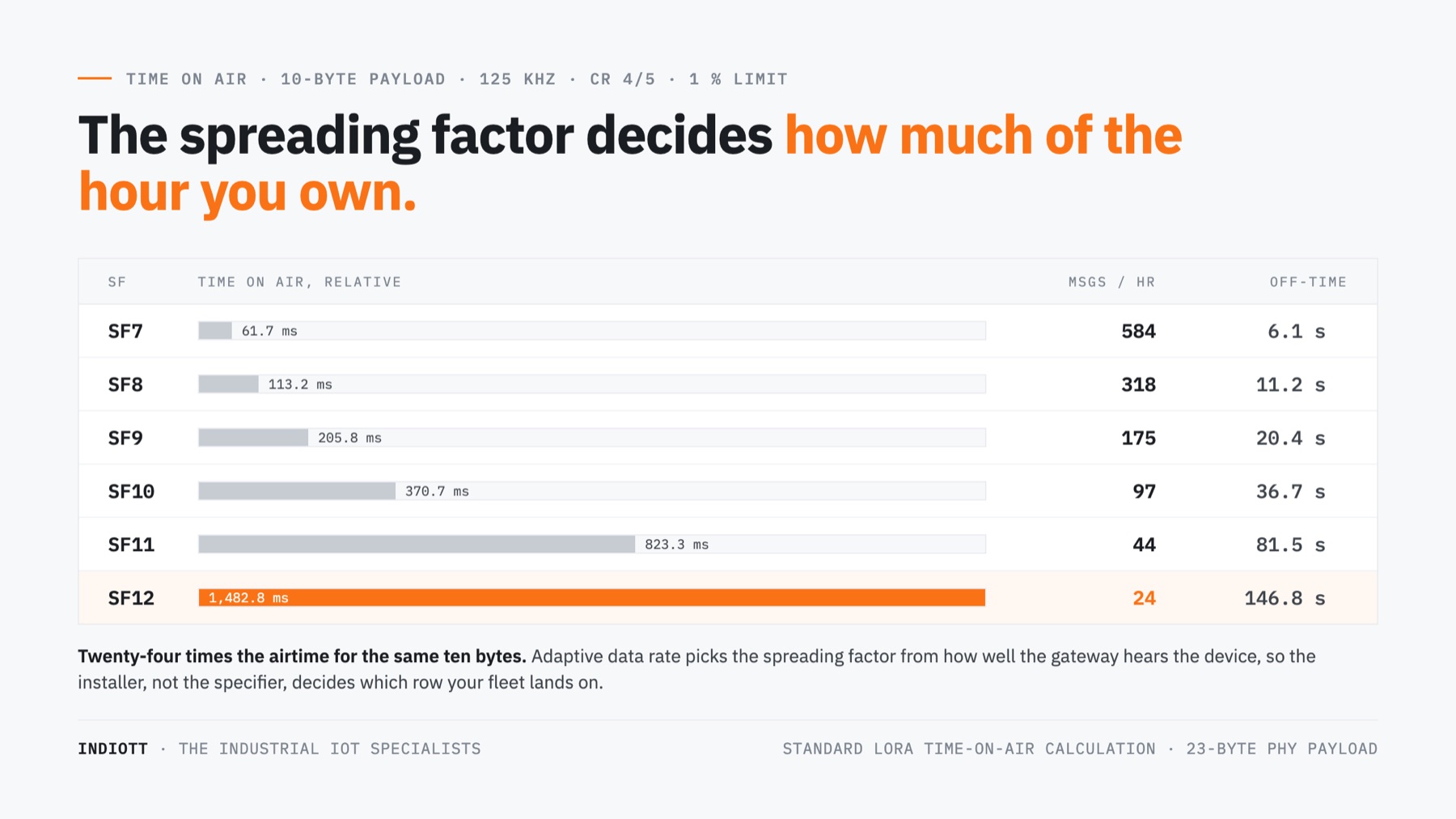
These come from the standard LoRa time on air calculation at 125 kHz bandwidth, coding rate 4/5, an eight symbol preamble and a ten byte application payload, which becomes 23 bytes with the LoRaWAN header and message integrity code. It checks out against the published reference case: 51 bytes at SF12 gives 2,793 ms.
At SF7 that message takes 61.7 ms, so the duty cycle permits about 584 messages an hour. Nobody sends a sensor reading 584 times an hour, which is why a well covered site never notices the rule exists. At SF12 the same message takes 1,482.8 ms and the ceiling collapses to 24 messages an hour. The data did not change. The distance to the gateway did.
The other way to hold it is the off time rule, which is how the radio stack actually implements the limit. After transmitting, a device must stay off the band for its own airtime divided by the limit, less the airtime it just used. At one percent that is airtime multiplied by 99. A single SF12 uplink imposes 146.8 seconds of mandatory silence before that device may legally transmit again.
This is the number that surprises people. A sensor at the edge of coverage, configured to report every five minutes, is spending most of the interval serving a penalty. Push it to every two minutes and it will simply not transmit, because a compliant stack refuses rather than breaks the law. The reading is not lost to interference. It was never sent.
Does changing channel reset the duty cycle?
No, and this is the most common misunderstanding in the whole subject. IR 2030 defines the observation frequency band as “the applicable frequency band”, which means an Ofcom entry, not a 125 kHz LoRa channel. Hopping between channels inside the same entry does not create a second allowance.
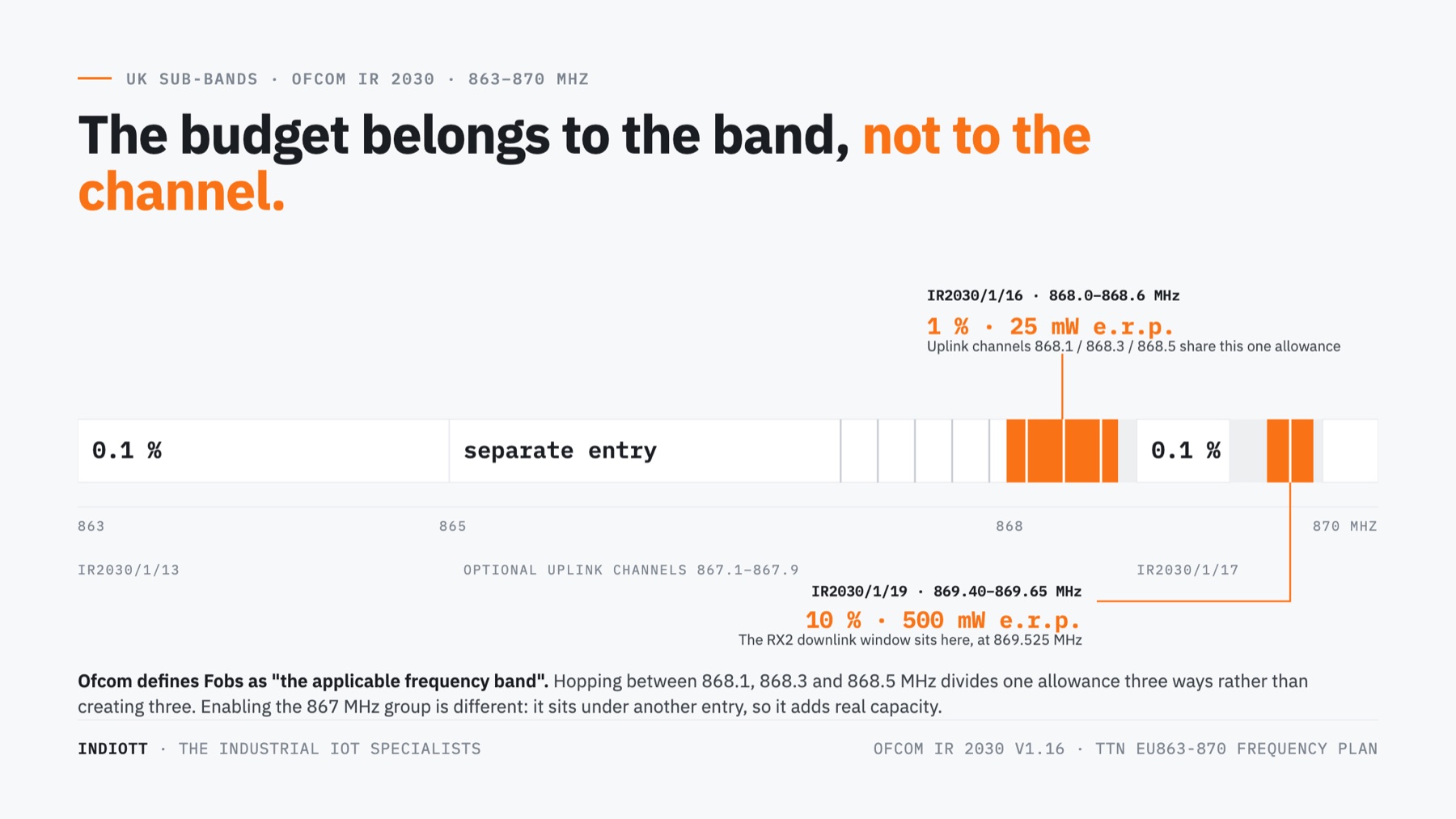
The EU863-870 frequency plan puts the three mandatory join channels at 868.1, 868.3 and 868.5 MHz. All three fall inside IR2030/1/16. A device spreading traffic across them has not tripled its allowance, it has divided one allowance three ways. The five optional channels at 867.1 through 867.9 MHz do sit under a different entry, which is one of the few levers that genuinely adds capacity.
It also explains a failure mode that looks like a bug. A device that joins, sends a handful of readings and then goes quiet for minutes at a time is usually not faulty. It has burned its band allowance on join attempts at a high spreading factor and is sitting out its off time. Check the spreading factor before the antenna.
Why the gateway runs out of duty cycle first
Because the duty cycle applies to a single transmitter, and the gateway is a single transmitter serving every device on the site. Five hundred sensors each hold their own 36 second budget. The one gateway that answers all five hundred of them holds a 36 second budget too. That asymmetry, not range, is what caps a mature LoRaWAN network.
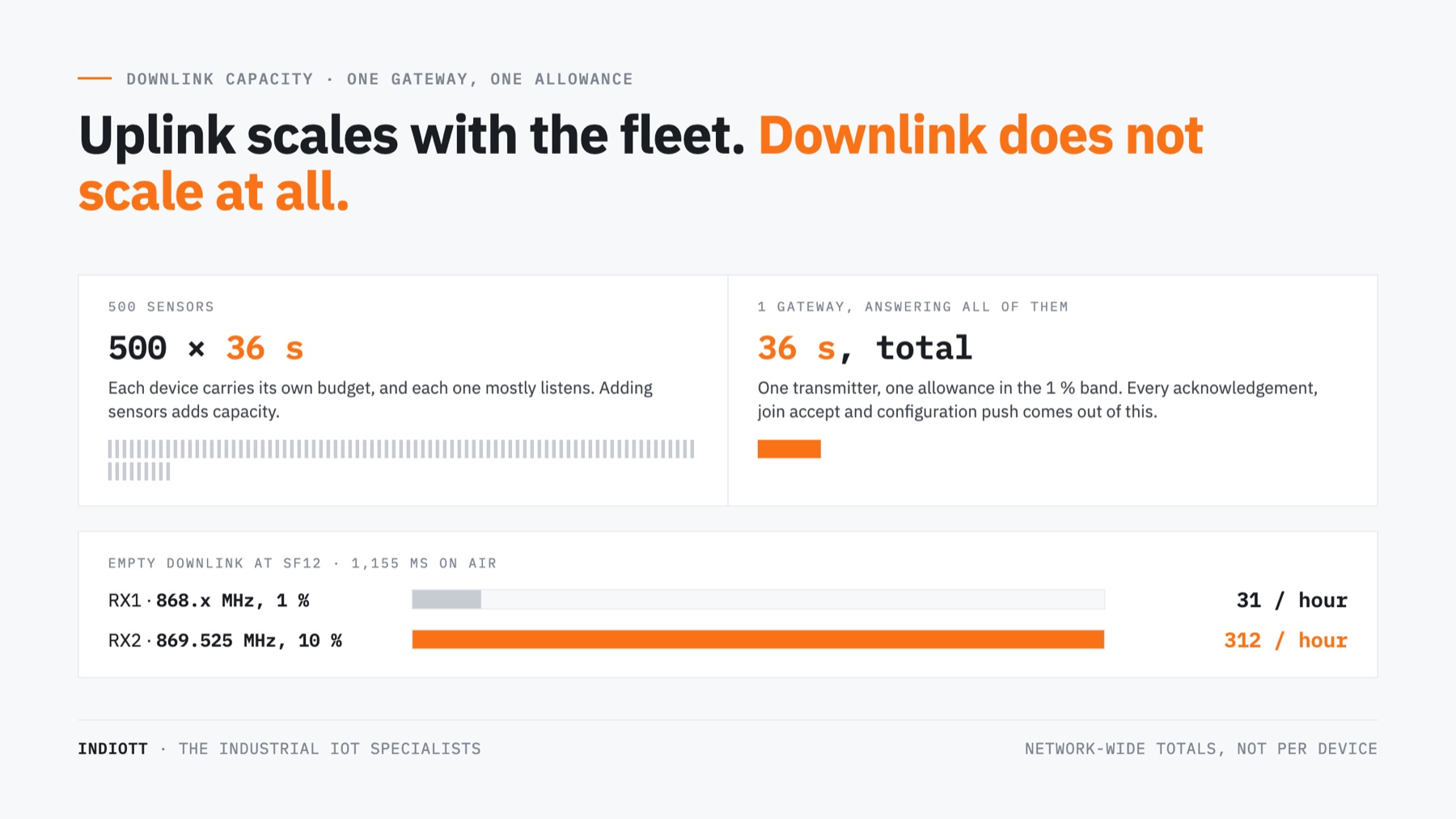
Work it through. A Class A device opens two receive windows after each uplink. The first, RX1, reuses the uplink channel and spreading factor, so it is inside the same one percent band. An empty acknowledgement at SF12 occupies 1,155 ms, which means the gateway can send roughly 31 downlinks an hour, network wide. Not per device. In total.
The second window is the escape hatch, and it is deliberate. RX2 sits at 869.525 MHz, inside IR2030/1/19, the 500 mW and 10 percent entry. Same message, ten times the allowance and roughly 13 dB more permitted power, lifting the gateway to about 312 downlinks an hour at SF12. The Things Network goes further, using a non standard SF9 in RX2 for Europe.
None of that is a vendor differentiator, which is the honest part. Every compliant gateway on the UK market, ours included, is bound by the same numbers. The Milesight UG67 at £658 and the UG63 at £99 have an identical duty cycle. The money buys an IP67 housing, concurrent multi channel reception, cellular backhaul and a mounting position that gets your fleet down to SF7. It does not buy a second of airtime.
What a confirmed uplink really costs
A confirmed uplink asks the network to acknowledge every message. It converts a problem the fleet can absorb into a problem only the gateway can pay for, and it is the single fastest way to exhaust a duty cycle budget you did not know you were sharing.
Two hundred sensors reporting every fifteen minutes generate 800 uplinks an hour. Unconfirmed, that is comfortable: the gateway only listens. Turn confirmation on and those 800 messages become 800 requests for downlink against a budget of about 31 in RX1, or 312 in RX2. The gateway drops acknowledgements, the devices read a missing acknowledgement as a lost message and retransmit, and the retransmissions demand more acknowledgements. It is a self inflicted denial of service, built out of a checkbox.
Public networks price this in explicitly rather than leaving it to physics. The Things Network’s fair use policy caps a device at 30 seconds of uplink airtime per day and 10 downlink messages per day, acknowledgements included. Ten a day, not ten an hour. If your design needs every message confirmed, the sensible fix is a different message pattern, not a bigger antenna.
How to design inside the duty cycle
Treat the duty cycle as a fixed budget you spend at design time, the way you would treat a power budget. Almost every decision that protects it also extends battery life, because both are paid for in milliseconds of transmission.
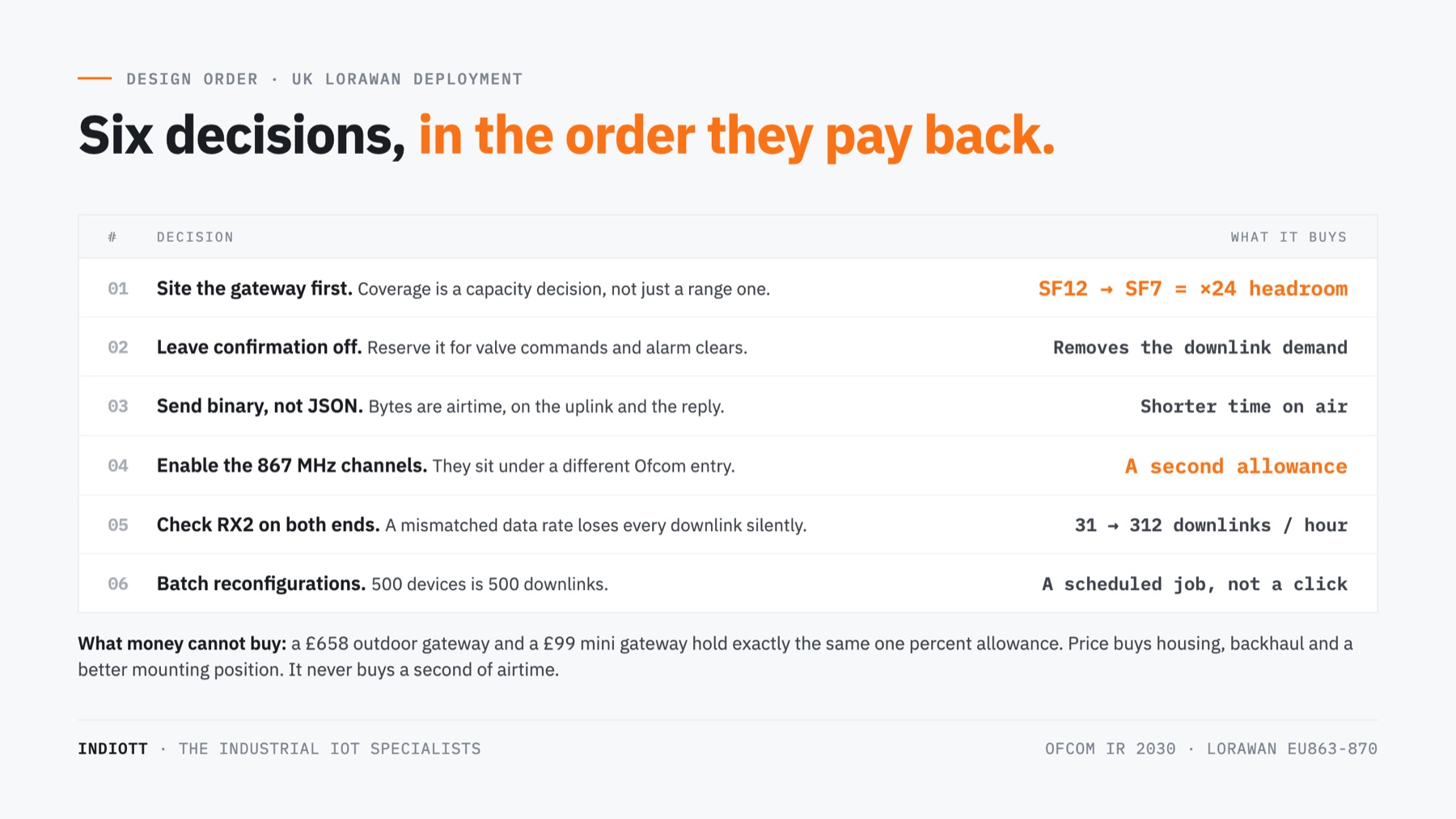
- Fix the coverage before the interval. Moving a fleet from SF12 to SF7 multiplies its duty cycle headroom by 24. No configuration change comes close. A well sited gateway is a capacity decision, not just a range decision.
- Leave confirmation off by default. Turn it on for the handful of messages where delivery genuinely matters, such as a valve command or an alarm clear, and never for routine telemetry.
- Shorten the payload. Send binary, not JSON. Bytes are airtime and airtime is duty cycle, on both the uplink and any downlink that answers it.
- Enable the optional channels. The 867.1 to 867.9 MHz group sits under a different Ofcom entry, so it adds real capacity rather than dividing the same allowance.
- Check that RX2 is configured correctly on both gateway and device. It is where the downlink capacity actually lives, and a mismatched RX2 data rate on an ABP device silently loses every downlink.
- Batch your reconfigurations. Pushing new settings to 500 devices is 500 downlinks. At 312 an hour on a good day, that is a job you schedule, not one you click.
Frequently asked questions
Is the duty cycle a LoRaWAN limit or a legal one?
Legal. It comes from Ofcom’s IR 2030 in the UK and from the equivalent CEPT and ETSI provisions across Europe, and it applies to any licence exempt transmitter in the band regardless of protocol. LoRaWAN stacks enforce it in firmware because the alternative is non compliant equipment. You cannot disable it on certified hardware, and you should not want to.
Does the duty cycle apply in the United States?
Not in the same form. The US915 plan has no percentage duty cycle. It applies a dwell time limit instead, capping any single transmission at 400 ms and requiring frequency hopping across channels. That is why a device rated for years of battery life on EU868 can behave quite differently on US915, and why published battery figures always name the frequency plan.
Can I use a higher power gateway to get more duty cycle?
No. Power and duty cycle are separate conditions in the same IR 2030 entry, and meeting one does not relax the other. The only place higher power and a higher allowance come together is 869.40 to 869.65 MHz, where IR2030/1/19 permits 500 mW and 10 percent, and that window is already used for RX2. Better siting, not more power, buys headroom.
How do I know if my network is hitting the duty cycle?
Look for downlinks queued but never delivered, acknowledgements arriving late or not at all, and devices whose message gaps stretch to a suspiciously round multiple of their airtime. Most network servers expose a per gateway transmit utilisation figure. If it sits near the band limit during working hours, that is your ceiling and retrying will not help.
How many sensors can one gateway actually carry?
On uplink, more than most sites will ever install, because the gateway only listens. The real answer is set by the downlink duty cycle and by how many of your devices need answering. A read only fleet of a thousand sensors is unremarkable. A fleet of two hundred that all expect confirmation is a harder problem than the datasheet suggests.
Does the duty cycle reset at midnight?
No. Ofcom specifies a continuous one hour observation period, so it is a rolling window rather than a daily quota. A quiet night does not earn you a busy morning. Anything that quotes the limit as 864 seconds a day is describing the same rule badly, and it is the reason so many deployments are surprised by it.
The number to take away
Thirty six seconds an hour, per transmitter, per band. Every other constraint in a LoRaWAN design, the reporting interval, the payload format, the acknowledgement policy, the gateway position, is a way of spending that budget well or badly. Understand the duty cycle and the rest of the specification stops being arbitrary.
If you are sizing a deployment, start with what LoRaWAN actually is and how it compares with NB-IoT for the same job, then work through our UK gateway buyer’s guide and the starter kit breakdown for real prices.
Tell us the site, the number of points and where the worst placed sensors will sit, and we will tell you which spreading factor your fleet will land on and whether your duty cycle budget survives it. That is a coverage question, and it is answerable before you buy anything. Start from our smart buildings solution or ask us directly.
Next step
Get a priced kit list for your site
Answer three quick questions and tell us where to send it. An engineer replies within one working day with the parts, the prices and the lead time.
Rather talk it through? Call 023 9223 3611
Received. An engineer has it.
You will hear back within one working day with the parts, the prices and the lead time. A confirmation is on its way to your inbox.
If it is urgent, call 023 9223 3611.