Milesight Industrial Routers Compared: UR41, UR35 and UR75
Last updated: 15 September 2026
Short answer: size an industrial router by ports and power budget, not by cellular generation. A single remote meter or PLC on solar takes the UR41 (from £86.04 ex VAT). A cabinet with several devices, serial kit and a VPN back to the SCADA host takes the UR35 (from £149.63). Sites that genuinely need gigabit throughput or 5G latency take the UR75 (from £460.12). Buying 5G for a device that sends 200 bytes an hour wastes £374.08 per site.
That last sentence is the whole argument. Most industrial router purchases are decided by the modem spec on the front of the datasheet, when the constraints that actually bite are how many Ethernet ports the cabinet needs, whether there is a serial device, and how much current the site can spare.
On this page:
- What makes a router industrial rather than office kit?
- UR41, UR35 and UR75 compared
- The power budget spec nobody reads
- Ports and SIMs: where the traps are
- The 48 V PoE ordering mistake
- What does an industrial router cost across a fleet?
- Remote access and VPN choices
- Which industrial router should you buy?
- Frequently asked questions
What makes a router industrial rather than office kit?
Temperature range, DC input, DIN rail mounting and serial ports. A consumer router expects a warm room and a mains socket. An industrial router expects a cabinet that swings between a frozen morning and a hot afternoon, a DC supply that sags, and a device on the other end speaking Modbus over RS485.
Milesight’s figures make the industrial router difference concrete. The UR35 and UR75 are both rated −40°C to +70°C; the UR41 is rated −40°C to +60°C. All three are IP30 metal-housed and all three mount on a DIN rail. All three take a wide DC input rather than a fixed adapter, which matters when the cabinet runs off a 24 V bus or a solar charge controller.
The other industrial marker is the serial port. The UR35 and UR75 each carry one RS232 plus one RS485; the UR41 carries a single port that is software-switchable between RS232 and RS485. If you are connecting legacy plant rather than IP devices, that port is the reason you are buying an industrial router at all.
UR41, UR35 and UR75 compared
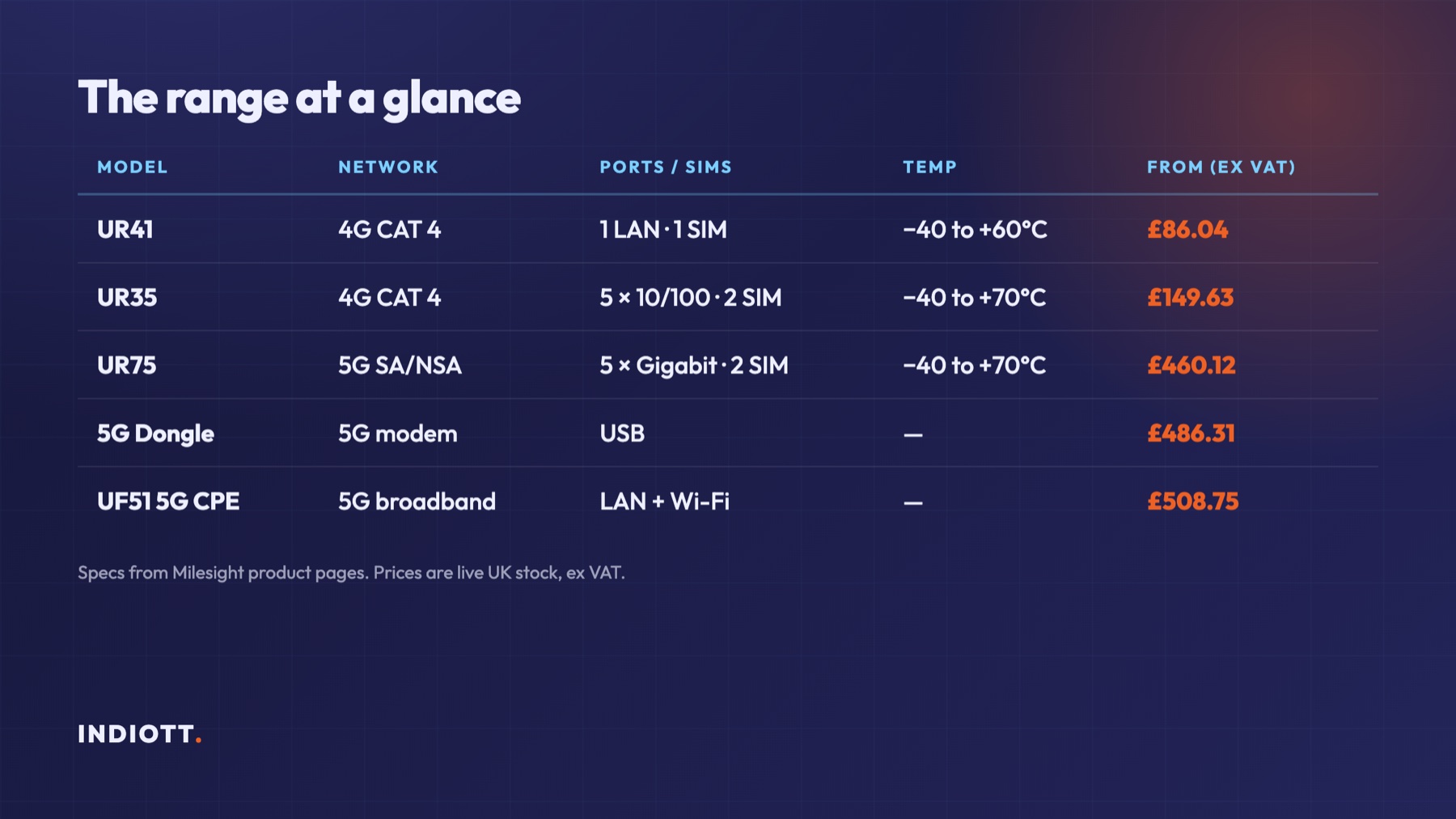
Three models cover almost every industrial router requirement. Specifications below come from Milesight’s published product pages; prices are live UK stock, ex VAT.
- UR41 — 4G LTE CAT 4 (or CAT 1 on the UR41L), one nano-SIM, one 10/100 LAN port, one software-switchable RS232/RS485, 1 DI + 1 DO, 5–24 VDC or 5 V USB-C, −40°C to +60°C, 70 × 55 × 22 mm. From £86.04.
- UR35 — 4G LTE CAT 4 at 150 Mbps down and 50 Mbps up, two mini-SIMs, five 10/100 RJ45 ports (1 WAN + 4 LAN), RS232 and RS485, 1 DI + 1 DO with galvanic isolation, optional 802.11 b/g/n Wi-Fi, 9–48 VDC, −40°C to +70°C, 135 × 103 × 45 mm, 485 g. From £149.63.
- UR75 — 5G NR SA and NSA across N1/N3/N5/N7/N8/N20/N28/N38/N40/N41/N77/N78, quoted to 4.67 Gbps, two mini-SIMs, five gigabit ports, RS232 and RS485, 1 DI + 1 DO, Wi-Fi 6 on both bands, USB 3.0 Type-C, 9–48 VDC, −40°C to +70°C. From £460.12.
Two further options sit alongside them for different jobs: the UF51 5G CPE (from £508.75) for delivering 5G broadband to a site, and the 5G Dongle (£486.31) where an existing gateway or PC just needs a modem.
The power budget spec nobody reads
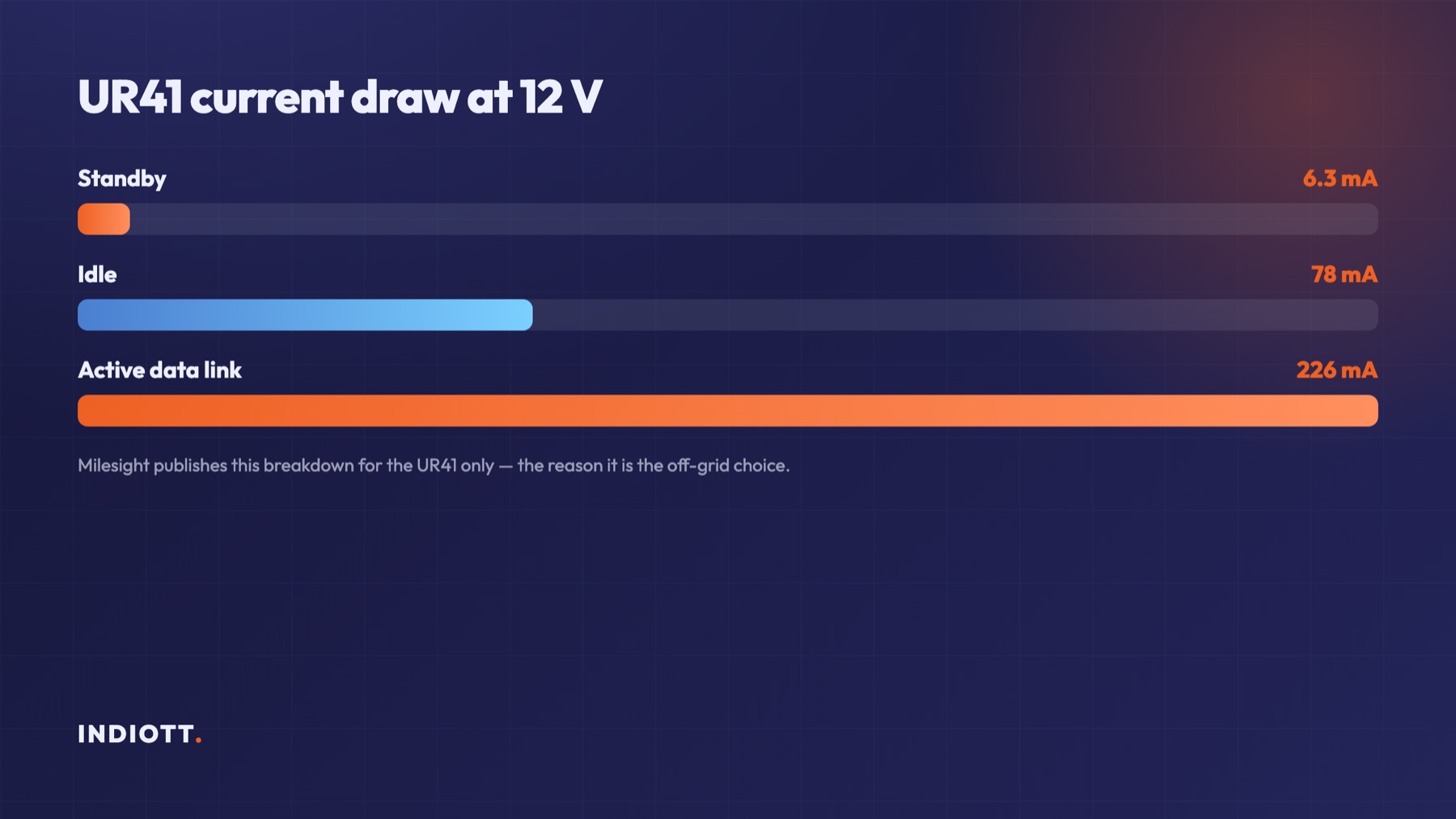
If the site runs on solar or battery, current draw decides the model, and only one of these publishes it. Milesight quotes the UR41 at 6.3 mA at 12 V in standby, 78 mA at 12 V idle, and 226 mA at 12 V on an active data link.
Those three numbers let you actually size a solar system around the industrial router. A remote flow meter that wakes hourly spends most of its life near the idle figure, so roughly 1 W continuous, and a modest panel and battery will carry it through a British December. Work that arithmetic before choosing the industrial router, because the alternative is discovering it in February.
The UR35 and UR75 do not publish an equivalent breakdown, and both are substantially larger devices with more radios and more ports to feed. That is not a criticism; they are mains or bus-powered cabinet devices by design. It does mean that on an off-grid site the UR41 is the only one of the three you can size with confidence from published figures, which is a stronger argument for it than its price.
The 5–24 VDC input on the UR41 also accepts a 12 V solar bus directly, where the UR35 and UR75 want 9–48 VDC. Both are wide, but only the UR41 will also run from a 5 V USB-C supply, which is genuinely useful for bench work and commissioning.
Ports and SIMs: where the traps are
The smallest industrial router has one Ethernet port and one SIM, and that is the single most common specification regret. One port means no second device without adding a switch. One SIM means no automatic failover to a second network when the primary carrier drops.
The UR35 and UR75 both carry two SIM slots, which is what dual-network resilience actually requires: two carriers, two APNs, automatic switchover. On a site where a truck roll costs more than the hardware, that second SIM is usually the cheapest insurance available.
Port speed on an industrial router is worth a moment too. The UR35’s five ports are 10/100, which comfortably exceeds its own CAT 4 ceiling of 150 Mbps down and is irrelevant for Modbus traffic. The UR75’s ports are gigabit, which they need to be, because a 100 Mbps port would throttle a 5G link long before the modem ran out. If you buy a UR75 and wire it through an old 10/100 switch, you have thrown away most of what you paid for.
The 48 V PoE ordering mistake
PoE on these routers needs a 48 V supply, and people order 12 V. Milesight states the input range as 9–48 VDC and notes explicitly that 48 V is needed for PoE. The UR35 offers optional PoE PSE on its LAN ports, so it can power a camera or an access point directly.
Order a 12 V PSU with that industrial router and the router works perfectly, the PoE does not, and the fault looks like a faulty camera. It is an afternoon lost on every install that repeats it. Specify the 48 V supply at order time whenever any downstream device will be PoE-powered.
What does an industrial router cost across a fleet?
Hardware is a one-off; the SIM is forever. Across 20 remote sites the hardware spread is stark: 20 × UR41 is £1,720.80, 20 × UR35 is £2,992.60, and 20 × UR75 is £9,202.40, all ex VAT at the lowest variant price. The gap between the smallest and largest industrial router choice is £7,481.60 on the same 20 sites.
That is before a single byte moves. Each site also needs a data SIM, and on the dual-SIM models two of them if you want carrier redundancy. We deliberately do not publish tariff figures here because they change constantly and depend on your volume, but the structure is what matters: hardware is paid once, connectivity is paid every month, and doubling the SIMs for resilience doubles that recurring line.
The planning conclusion is unglamorous. Choose the cheapest industrial router that satisfies the port count, SIM count and power constraints, then spend the difference on the second carrier rather than a faster modem. Redundancy prevents site visits; throughput you do not use prevents nothing.
Remote access and VPN choices
The UR35 is the most VPN-capable industrial router of the three, supporting OpenVPN, IPsec, GRE, L2TP, PPTP, DMVPN and WireGuard. The presence of WireGuard matters more than the length of that list, because it is the modern option: a small codebase, fast handshakes, and no interactive session to babysit on a link that drops.
The presence of PPTP on the list matters too, in the opposite direction. PPTP is long obsolete and should not be used for OT remote access under any circumstances. That an industrial router supports it is a compatibility feature, not a recommendation.
Remote access into an OT network deserves more thought than a VPN protocol choice. Our guides to OT cybersecurity best practices and data diodes versus firewalls cover where a routed VPN is appropriate and where it is not.
Which industrial router should you buy?
Answer four questions and the industrial router picks itself.
How many devices are in the cabinet? One device, UR41. Two or more, or you want a spare port for a laptop during commissioning, UR35.
Is the site on grid? Off grid or solar, UR41, because it is the only one with a published current budget. On grid or on a 24 V bus, either of the larger models.
Does an outage cost a site visit? If yes, you need two SIMs, which means UR35 or UR75.
Does anything actually need more than 150 Mbps? Video, remote desktop to an HMI, or a site acting as a branch office, yes: UR75. Telemetry, metering and SCADA polling, no. Our industrial IoT cost guide puts these figures in the context of a whole deployment budget.

Frequently asked questions
Do I need 5G for industrial IoT?
Rarely. Telemetry, metering and SCADA polling are measured in kilobytes, and 4G CAT 4 at 150 Mbps is already far beyond that. Buy 5G when you are carrying video, running a site as a branch office, or need the lower latency for a control loop. Otherwise the £310.49 difference between a UR35 and a UR75 buys sensors instead.
Can an industrial router run on solar power all year?
The UR41 can, and it is the model to choose for it, because Milesight publishes the current draw at 12 V in standby, idle and active states. Size the panel and battery against the idle figure plus your expected data-link duty cycle, and allow generously for a UK winter.
What is the difference between a router and a LoRaWAN gateway?
A cellular router carries IP traffic over a mobile network. A LoRaWAN gateway receives long-range, low-power sensor packets and forwards them. Many sites need both, and some Milesight gateways include a cellular backhaul. Our gateway buyer’s guide covers the distinction.
Will these work on any UK network?
The UR35 covers 4G LTE, WCDMA and GSM with regional band variants, and the UR75 covers the main UK 5G sub-6 bands including N1, N3, N7, N28, N77 and N78. Confirm the exact variant against your chosen carrier’s bands at order time, since band support differs by region.
How do I get two networks for redundancy?
Use a model with two SIM slots, which means the UR35 or UR75, and provision SIMs from two different carriers rather than two SIMs on the same network. A single-carrier outage is the failure mode you are insuring against.
Can I mount an industrial router on a DIN rail?
Yes. All three support DIN rail mounting alongside desktop and wall options, and all three are IP30, so they belong inside an enclosure rather than exposed to weather.
The bottom line
Count the ports, count the SIMs, check the power source before choosing an industrial router, and only then look at the modem. Most remote sites are well served by a UR41 from £86.04 or a UR35 from £149.63, and the UR75 earns its £460.12 only where throughput or latency genuinely justifies it. Remember the 48 V rule if anything downstream is PoE. Prices above are live UK stock ex VAT — browse the range, or send us the cabinet contents and site power arrangement and we will spec it and quote within one working day.
Next step
Get a priced kit list for your site
Answer three quick questions and tell us where to send it. An engineer replies within one working day with the parts, the prices and the lead time.
Rather talk it through? Call 023 9223 3611
Received. An engineer has it.
You will hear back within one working day with the parts, the prices and the lead time. A confirmation is on its way to your inbox.
If it is urgent, call 023 9223 3611.